Skip to content
Good Fork Download Good Fork

Your grocery list automatically planned alongside your meals

Plan your week or month with Good Fork, and we'll automatically bring all your ingredients together into one grocery list, organized by aisle. When it's time to shop, open Good Fork on your iPhone or Apple Watch and check things off as you go. If you're shopping with someone, Good Fork Pro lets you split up without losing track of what's already in the cart and what's left to grab.

Weekly grocery lists are included with Good Fork Free, while Pro lets you plan and build grocery lists up to four weeks ahead.

Download Good Fork on the App Store

On iPhone and iPad. Coming soon to Android.

We liked our old grocery app, but we still wanted a few things to work differently.

We used the same meal planning app for three years. It was good, and we genuinely enjoyed using it. But after enough grocery trips together, we started noticing the little things we wished it did differently.

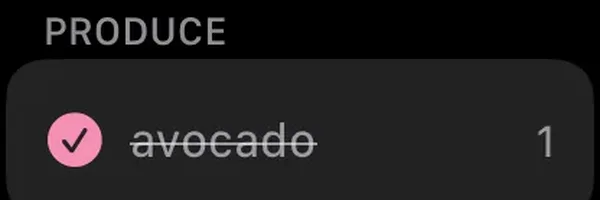
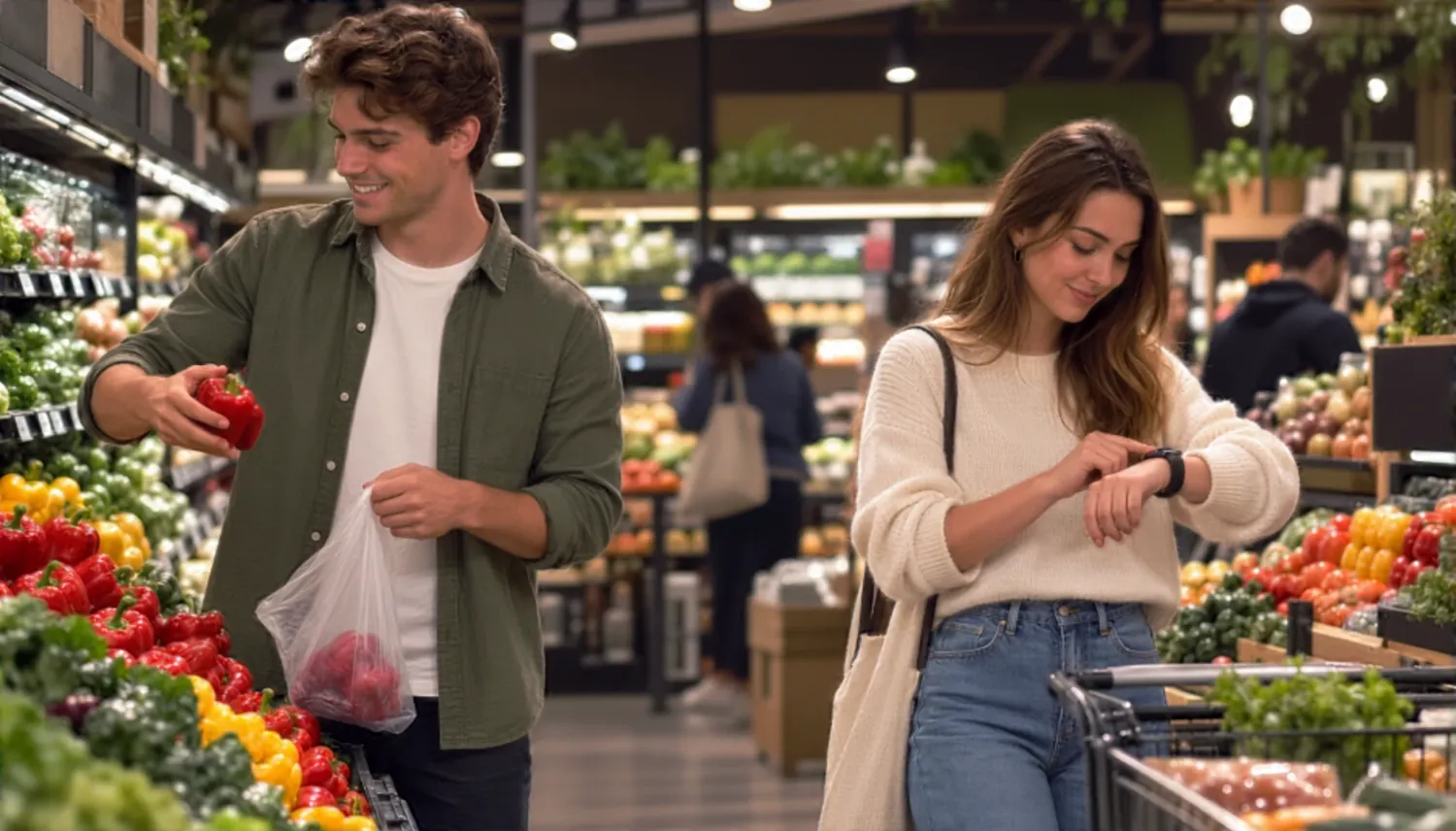
  1. Our phones were out for practically the entire trip.

    And constantly unlocking them was annoying. Now we can glance at a watch, check something off and keep going.

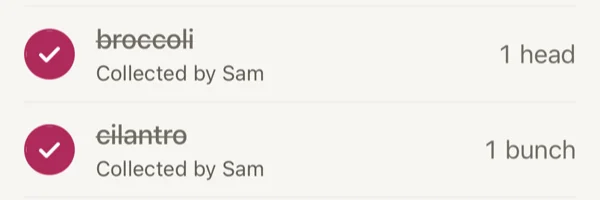
  2. We'd sometimes find something checked off and have to ask who grabbed it, or whether either of us had actually picked it up.

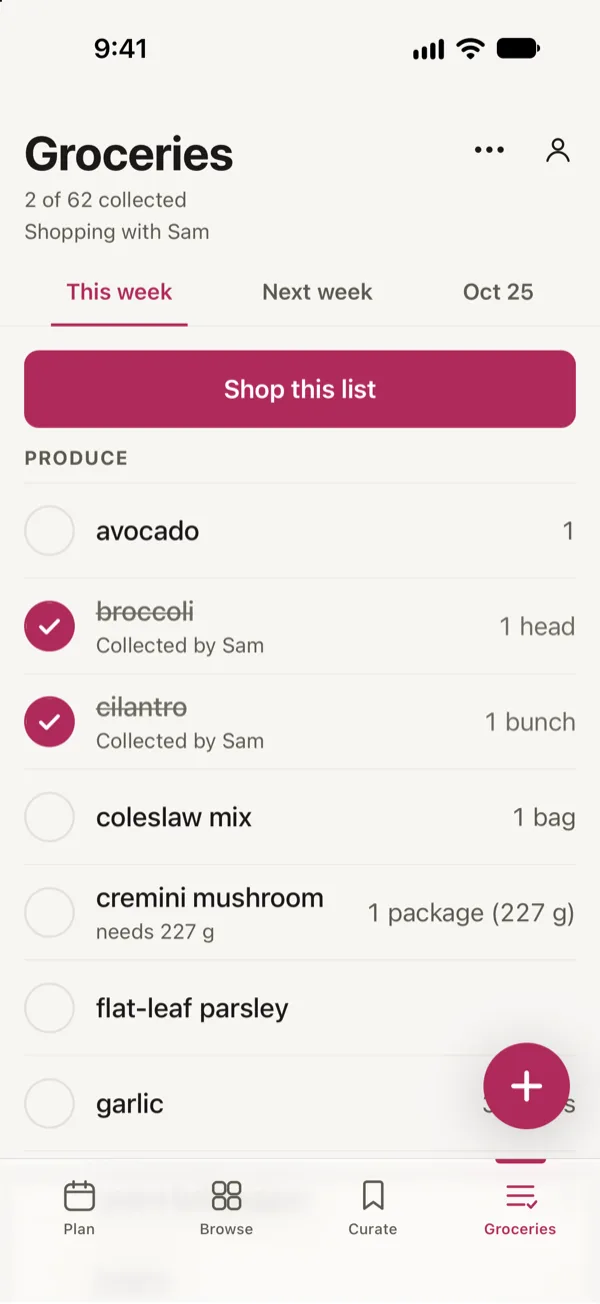
    Checked-off items show who they were collected by.

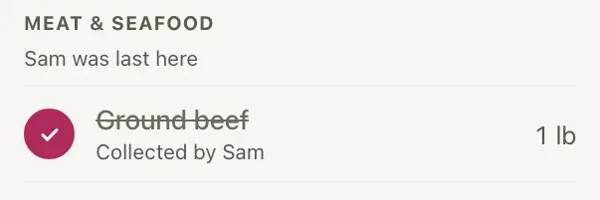
  3. Then comes the part where you're looking down every aisle trying to find each other again.

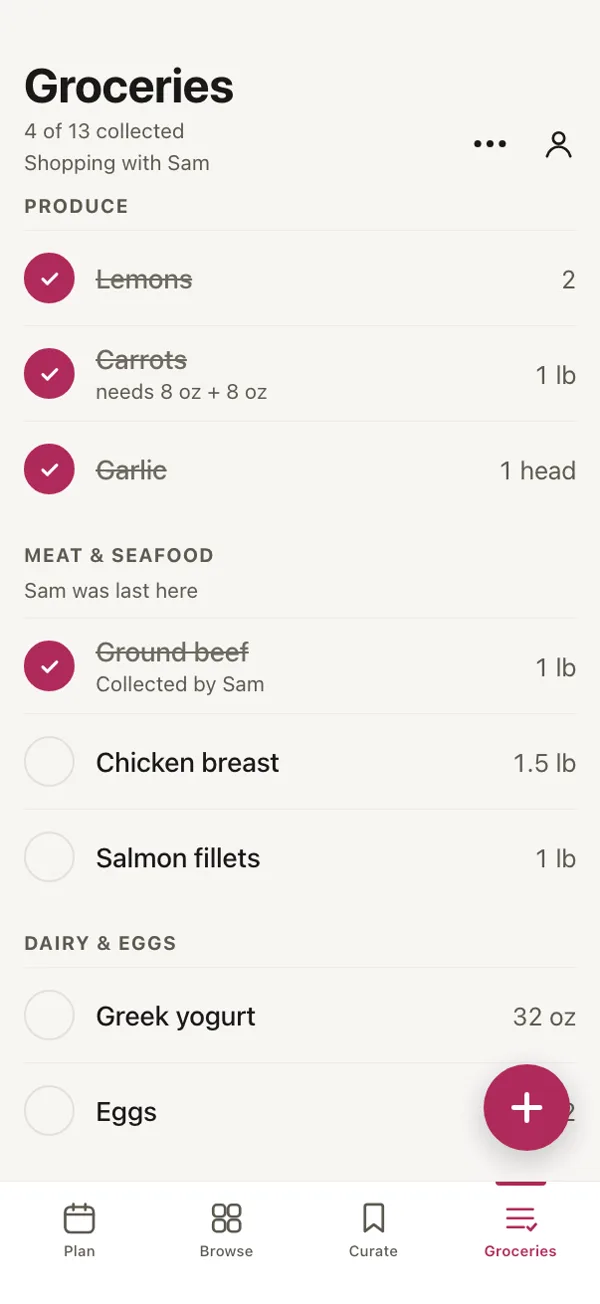
    Good Fork shows the last aisle where another household member checked something off.

Your meal plan makes the grocery list

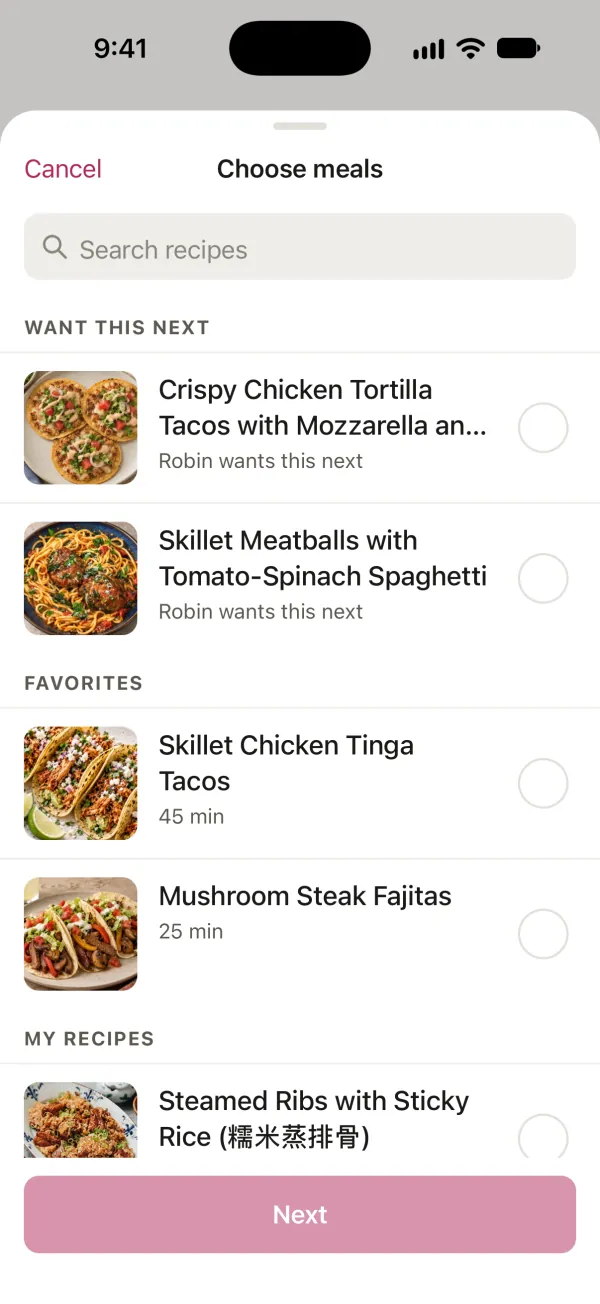
Good Fork automatically builds a grocery list from the recipes in your meal plan. Choose what you want to cook for the week or month, and the ingredients are collected into one shopping list, organized by grocery aisle.

Read more

As you build your meal plan, your grocery list comes together in the background. Every recipe you choose, whether it's from Good Fork's collection or something you've saved from a website or social post, contributes to one organized list.

Good Fork recognizes ingredients shared across recipes and combines their quantities automatically. When measurements can't be neatly combined, it preserves both so you know exactly what each recipe calls for. Everything is then organized by grocery aisle, making your trip through the store that much easier.

By the time you've finished planning your meals, your grocery list is already waiting for you. And for anything else you need around the house, you can add it directly or ask Siri.

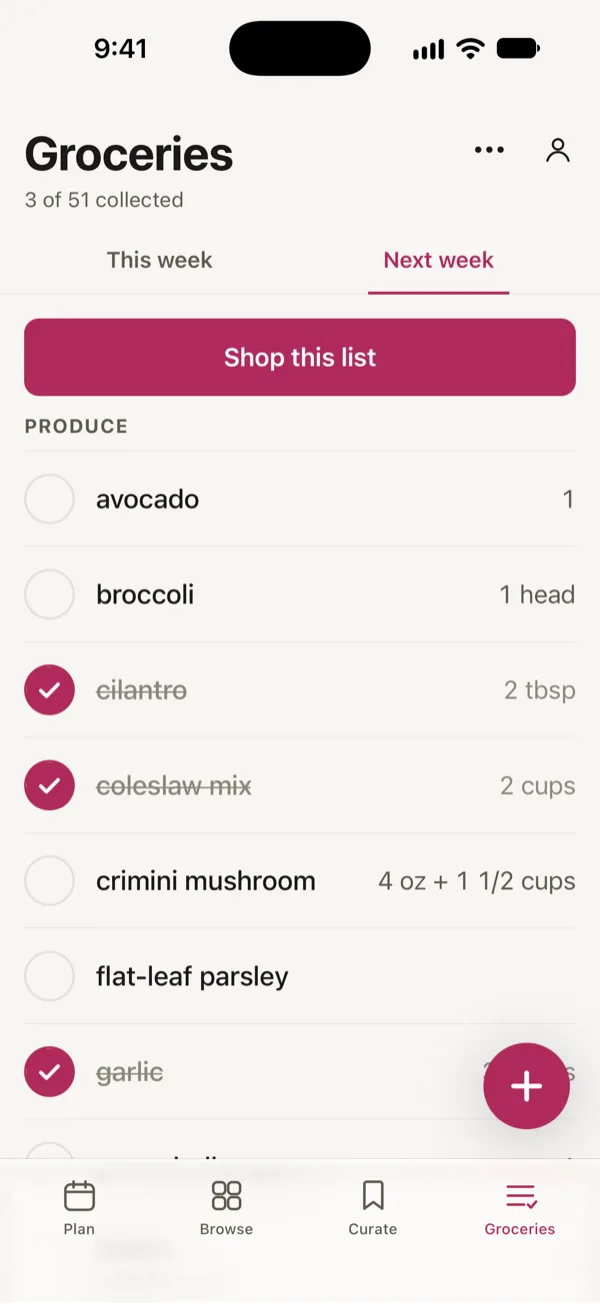
Good Fork’s grocery list for next week, sorted by aisle, with three items checked off and Shop this list at the top.
Choosing meals in Good Fork: two recipes Robin wants next sit at the top, above the household’s Favorites.

Shop together without following each other around

Good Fork Pro gives everyone in your household the same grocery list, updated live on their own phones. When one person checks off an item, everyone else sees the change, including who collected it.

Read more

Shopping together doesn't have to mean spending the whole trip side by side. With Good Fork, you can head toward produce while someone else picks up meat and seafood, knowing you're both working from the same list. Everything stays in sync, so you always have an up-to-date picture of what's in the cart and what's left to find.

You'll see when someone else is shopping, and every checked-off item shows who collected it. It's one of those little details we always wished we had. If something gets checked off by accident, there's no guessing who picked it up or whether it actually made it into the cart.

The whole household can get involved, too. Chefs can give kids ages 13 and older access to view the list and check off groceries, while keeping the ability to add items with the adults. And because one Good Fork Pro subscription covers everyone in your household, there's no need for separate subscriptions as more people join.

The grocery list in Good Fork, shopping with Sam: broccoli and cilantro are checked off, each Collected by Sam.

Find each other without searching every aisle

Good Fork shows the last aisle where another household member checked something off.

Read more

If Sam last collected something from Meat & Seafood, that's a pretty good place to start looking instead of wandering around the store.

It doesn't track anyone's physical location. The aisle is based on their most recent grocery list check-off, so it gives you an idea of where they were shopping last.

The grocery list in Good Fork, shopping with Sam: under Meat & seafood, Sam was last here.

Keep your phone in your pocket

Good Fork puts your grocery list on Apple Watch, so you can check items off from your wrist instead of pulling out your phone every time you grab something.

Read more

This was one of the things we wanted most when building our own grocery list.

We used to have our phones out for practically every item. Now, we can glance at a watch, check something off and keep going.

And when you remember something else you need, you can ask Siri to add it to the list. You don't have to wait until you're back in the app to write it down.

You can still use the full grocery list on your iPhone or iPad whenever you prefer.

Rather skip the grocery store?

Good Fork lets you send your grocery list to Walmart or Kroger for pickup or delivery in the United States.

Read more

Plan your meals as usual, let Good Fork put together the ingredients, and send the list to your preferred retailer when you're ready to shop.

You can use Walmart and Kroger with either Good Fork Free or Pro. You don't need a household subscription to shop online.

Try an aisle-sorted grocery list right now

Want to see how a grocery list organized by aisle works before downloading Good Fork?

  • We built a free grocery list template you can use right in your browser.
  • Add the groceries you need, and the tool groups recognized items by aisle as you go.
  • You can check off items, print the list or save it as a PDF.
  • There's no account required.

The template is handy when you already know what you need to buy. If you'd rather have your list built from the meals you're planning, that's where the Good Fork app comes in.

Your grocery list is free. Sharing it is part of Pro.

You don't need to pay for Good Fork to build a grocery list from your meal plan.

Free

Plan your meals for the week, and Good Fork builds a grocery list with ingredients combined and sorted by aisle.

  • There's no separate limit on how many items you can have on the list. You can add groceries that aren't part of your planned recipes, check items off from Apple Watch and send your list to Walmart or Kroger in the US.
  • The Free plan is for one person.

Pro PRO

Pro includes everything in Free, plus a shared grocery list for your household. Everyone gets their own account, and the list stays in sync as people shop.

  • You'll see who checked off each item and the last aisle where someone collected something. You can also plan up to four weeks ahead, with grocery lists for the weeks you've planned.
  • One Pro subscription covers the entire household, with no limit on members.

Frequently asked questions

Is Good Fork a free grocery list app?

Yes. Good Fork Free includes a grocery list built automatically from your weekly meal plan. Ingredients are grouped by aisle, and matching amounts are combined. There's no separate grocery list item limit on the Free plan. Pro adds household sharing and planning up to four weeks ahead.

Can Good Fork make a grocery list from my recipes?

Yes. Add recipes to your meal plan, and Good Fork collects their ingredients into one grocery list. Matching ingredients are combined, including their quantities. You can plan meals using Good Fork's recipes or recipes you've saved from websites and social posts.

Does Good Fork organize my grocery list by aisle?

Yes. Good Fork groups your ingredients into grocery store sections, such as Produce and Meat & Seafood. Instead of searching through one long list, you can work through the items in each section as you shop.

Can I add groceries that aren't part of a recipe?

Yes. You can add items directly by typing or ask Siri to add something to your grocery list. You're not limited to the ingredients from your meal plan.

Can I share a grocery list with my partner or household?

Yes, with Good Fork Pro. Everyone in your household gets their own account and shares the same grocery list. Changes appear across everyone's phones in real time. One Pro subscription covers the entire household, with no limit on members.

Can I see who checked something off the grocery list?

Yes. With Pro household sharing, checked-off items show who collected them. For example, an item might say "Collected by Sam." This helps when you're shopping together and want to know whether someone already picked something up.

Can we split up while grocery shopping?

Yes. With Good Fork Pro, everyone in your household can shop from the same list on their own phone. When someone checks off an item, the update appears for everyone. You can also see the last aisle where another person checked something off, which can help you find each other in the store.

Can I check off groceries from my Apple Watch?

Yes. Good Fork has an Apple Watch grocery list, so you can check off items from your wrist without taking out your iPhone for every item.

Does Good Fork track my location in the grocery store?

No. Good Fork doesn't use phone location tracking to show where another person is shopping. The last-aisle information comes from grocery list activity. When someone checks off an item, Good Fork can show the aisle associated with that item as their last shopping aisle. It tells you where they last collected something, not their current physical location.

Can kids help with the grocery list?

Yes. With Pro, a Chef can allow a Kid account for someone ages 13 or older to see the household grocery list. When access is enabled, Kids can check off items while shopping, but they can't add new groceries. The Chef controls whether they have access to the list.

What are the grocery list limits on the Free plan?

Good Fork Free builds a grocery list from one week's meal plan, without a separate limit on grocery list items. Pro lets you plan up to four weeks ahead and provides grocery lists for those weeks. Household sharing also requires Pro.

Can I send my grocery list to Walmart or Kroger for free?

Yes. Sending your list to Walmart or Kroger for pickup or delivery in the United States is available with Good Fork Free and Pro. You don't need Pro to use the retailer handoff. Any purchase and delivery costs are handled separately by the retailer.

Is Good Fork available on Android?

Good Fork is currently available on iPhone and iPad, with Apple Watch support for grocery shopping. Android is coming soon. We haven't announced a release date.

Can I use Good Fork as a shopping list app without planning meals?

Yes. You can add grocery items directly to your list by typing or using Siri. Meal planning is what allows Good Fork to build the ingredient list for you, but you can add other groceries whenever you need them.

Less time making lists. More time making dinner.

The grocery list is one less thing to figure out before dinner. Good Fork pulls everything together from your meal plan, so you can get the shopping done and enjoy what you're cooking.

Download Good Fork on the App Store

Coming soon to Android.